How to download MapleStory Classic World?
Install MapleStory from the Nexon Launcher or Steam, verify a Nexon account, enable Classic World, and patch. There is no separate Classic-only .exe from Nexon.

How to download MapleStory Classic World: Steam or Nexon Launcher, enable Classic World. Founder’s Access Oct 6, Grand Launch Oct 21. Verified October 2026.
Install MapleStory, then enable Classic World on Launcher or Steam.
~7 min read
How to download MapleStory Classic World is not a separate installer. You install MapleStory from the Nexon Launcher or Steam, then turn Classic World on. NEXON Korea Corporation / Nexon America Inc.. This is Nexon’s classic MMORPG world beside modern MapleStory — not MapleStory Worlds mobile, not a private server, not beanfun Classic. Verified October 7, 2026. Nexon MSCW · Steam MapleStory.
MapleStory Classic World Founder’s Access opened October 6, 2026, 11:00 AM PDT. Grand Launch is October 21, 2026, 11:00 AM PDT. Progress carries; Nexon FAQ: no wipe. After you log in, the beginner guide covers Maple Island.
| Fact | Detail |
|---|---|
| Play | Nexon Launcher or Steam MapleStory → Classic World toggle |
| Developer / publisher | NEXON Korea Corporation / Nexon America Inc. |
| Founder’s Access | October 6, 2026, 11:00 AM PDT |
| Grand Launch | October 21, 2026, 11:00 AM PDT |
| Wipe | None — Founder’s progress carries (Nexon FAQ) |
| Platform | PC / Mac · Nexon Launcher + Steam |
| Price | Free to play |
| Access pack (Steam) | Zakum Package DLC · https://store.steampowered.com/app/5142560/MapleStory_Classic_World__Zakum_Package/ |
| Not this game | Worlds mobile · private servers · beanfun Classic |
| Checked | October 7, 2026 |
Matched by build plan, shared topics, and guide progression — not random related links.
Searches for how to download MapleStory Classic World land here because there is no standalone storefront named only Classic World. You download MapleStory, then you switch worlds. That is true on both clients Nexon ships for this title.
Step order that actually works: register and verify a Nexon account on nexon.com, install the launcher or Steam MapleStory, wait for the Classic World switch to appear, patch, then create a new Beginner. Characters from modern worlds stay in modern worlds.
Launcher and Steam both need a verified Nexon login. If you skip email verification, Play fails after the download finishes and it looks like a “how to download MapleStory Classic World” problem when it is an account problem.
Mac is supported in Nexon’s platform notes for this world. Treat that as PC/Mac, not iOS/Android. Phone listings named MapleStory Worlds are a different product.
You are not installing a Roblox place, a Taiwan/Hong Kong beanfun Classic build, or a private “old school” server. Those searches collide with MapleStory Classic World because the brand is old. If the file is not MapleStory from Nexon or Steam app 216150, stop.
Install the Nexon Launcher first if you do not already have it. In the library, find MapleStory, use the Classic World toggle, and let the Classic client patch. On Founder’s Access day the standalone Classic client was the extra download after that toggle; if the switch is missing, you are on the wrong MapleStory entry or still on a modern-only install.

An old launcher install of modern MapleStory is useful: you already have the account and most of the files. You still have to flip Classic World. Leaving the toggle off puts you in the current global world, which is why people report “I downloaded it and it looks like 2026 MapleStory.”
If the library shows MapleStory Worlds instead, you picked the mobile/UGC product. Back out. The Classic World toggle never starts in that library tile.
Let the Classic client finish. Killing the launcher mid-patch is the usual way people redo the whole download the next morning. After it completes, the next page is not more install steps — it is the beginner guide.
Nexon lists PC and Mac for this world. Use the official launcher or Steam on macOS; do not hunt a sideloaded .dmg. If Classic World never appears, you are on the wrong MapleStory product or a region the toggle does not ship to — VPN “fixes” that break the Nexon login are how accounts get locked, not how the Nexon Launcher is supposed to work.
A login queue after Founder’s Access is still a successful install. Do not repair-install mid-queue. Keep the Nexon Launcher (or Steam) open, wait, then make the Beginner. Region locks and cash-shop currency are not this page; if Play works, you downloaded it.
MapleStory Classic World on Steam is bundled with regular MapleStory. Install and update app 216150 first so launch-day (or Founder’s) Classic patches stay small. Then enable Classic World the same way the launcher does: inside MapleStory, not as a second Steam title.
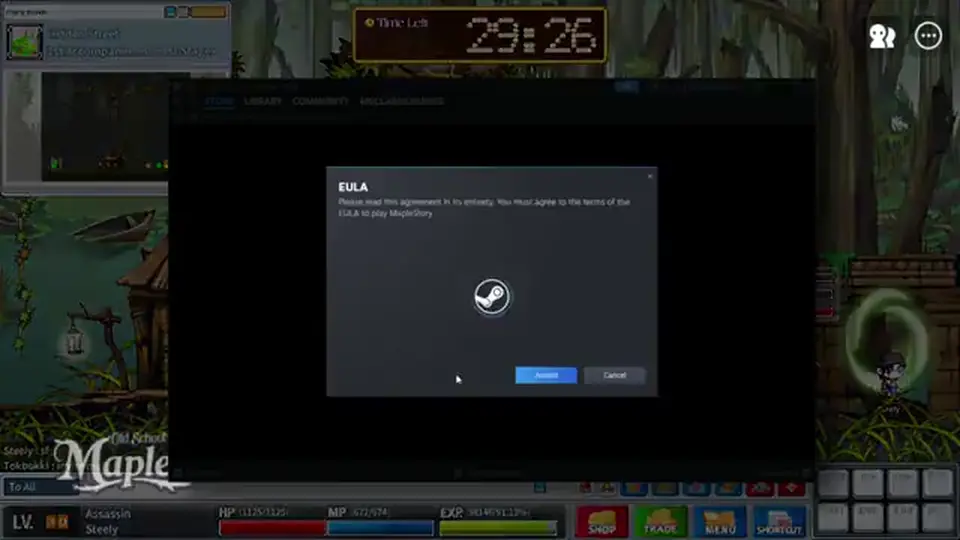
Steam Play still asks for a Nexon login. In Nexon account settings, link Steam ahead of time. Doing that during a login queue is how people sit on a “download finished” screen with no character select.
Founder’s Access on Steam is the Zakum Package DLC, not a coupon box. Orange Mushroom / Zakum details and mailbox rules live on Founder’s Pack. There is no promo-code page because packages auto-mail.
Launcher and Steam characters in MapleStory Classic World are the same world once Classic World is on and the Nexon ID matches. Do not make a second Beginner on the other client thinking you will merge them later.
Two clocks, both 11:00 AM PDT. Founder’s Access: October 6, 2026, 11:00 AM PDT. Grand Launch: October 21, 2026, 11:00 AM PDT (18:00 UTC). The MapleStory Classic World release date people argue about is usually Grand Launch. Founder’s is the paid-access window that already opened.
Nexon FAQ: Founder’s progress carries into Grand Launch. No wipe. If a Discord post says “servers reset on the 21st,” treat it as rumor unless Nexon posts it. Package purchase window closes October 14, 2026, 11:59 PM PDT; mailbox claim still runs to November 30, 2026, 11:59 PM UTC.
Orange Mushroom and Zakum packages granted Founder’s Access. The Snail package did not. After Grand Launch the world is free to play. Buying a gray-market “beta key” does not substitute for those packages and is not how to download MapleStory Classic World.
Launch-live space is Maple Island plus Victoria Island. Ossyria / Orbis / El Nath are not confirmed launch continents. Pirate and 3rd job stay off this page’s install checklist — they are job FAQ on classes, not a download blocker.
A verified Nexon email, a patched MapleStory client, Classic World enabled, and a name list. In-game names are not shared with modern MapleStory, so every IGN is new. Copy a first choice and two backups before character select; launch crowds take the obvious names in minutes.
Packages land in the in-game mailbox automatically. You cannot open them until you leave Maple Island. That is a play step, not an install step. Claim window and 30-day open timer: Founder’s Pack.
Official GMS Discord is discord.gg/maplestory. Classic-intent community Discord is discord.gg/osms (Unofficial). Both are on Discord. Patch notes and queue jokes belong there; the client still has to finish downloading.
Installing MapleStory Worlds. Skipping Nexon email verify. Forgetting the Steam link. Creating the character in the modern world because Classic World was still off. Paying eBay for an “access code.” Expecting a promo-code box. None of those are how to download MapleStory Classic World.
AP and SP panic belongs after you exist in-world. Have a first-job plan from classes so you do not brick a mule, then train on the leveling guide. The download is done when character select shows Classic World, not when Steam says “installed.”
Logged in? Run Maple Island on the beginner guide.
Buying or claiming early access: Founder’s Pack.
Need a voice channel: Discord.
Install MapleStory from the Nexon Launcher or Steam, verify a Nexon account, enable Classic World, and patch. There is no separate Classic-only .exe from Nexon.
Yes. Install MapleStory (app 216150), link Nexon to Steam, enable Classic World. Zakum Package is the Steam DLC for Founder’s Access.
Only if you play off Steam. Steam still needs a Nexon account. Both paths use the Classic World switch.
Founder’s Access October 6, 2026, 11:00 AM PDT. Grand Launch October 21, 2026, 11:00 AM PDT. Progress carries; no wipe per Nexon FAQ.
No. Access was Orange Mushroom / Zakum, then free at Grand Launch. Ignore eBay keys.
No. Classic World characters are separate. Make a new Beginner.
Matched by build plan, shared topics, and guide progression — not random related links.